
FEES • SETTINGS • SAFETY
Terminal (Padre): Solana Setup, Fees & How To Use

What is Terminal (formerly Padre)?
Terminal interface and source review: 29 September 2026. Screenshots show the interface at capture time.
Compare Terminal with other Solana trading terminals →
Terminal is the current name of the product formerly called Padre or Padre.GG. The existing Padre guide and entry route refer to that same product. Active trading is recorded for Solana, Ethereum, Base, BNB Chain and Robinhood. Arc has an observed discovery view and order form, but its trading availability remains unconfirmed.
Trading safety basics
Trading terminals and Telegram bots can lose money quickly, especially during fast token launches.
Always use a dedicated trading wallet, verify token contract addresses before trading, and start with small test trades.
Keep slippage conservative until you understand how the platform behaves.
Execution settings can improve speed, but they do not guarantee protection against bad fills, MEV activity, or scam tokens.
Why traders use Terminal (formerly Padre)
Many traders use Padre (now branded as Terminal, sometimes called Padre GG) because it provides a fast browser-based on-chain trading terminal designed for manual trading. Instead of relying on Telegram trading bots, traders can execute buys and sells directly from a dedicated web trading interface.
The platform combines token discovery, live market data, and execution controls in a single dashboard. It is widely used as a Solana trading terminal during fast token launches, while also supporting EVM chains such as Base and BNB Chain, with Robinhood also recorded as active. Ethereum trading is now confirmed active.
Terminal, formerly Padre, offers a web trading interface. Current native-mobile and full PWA support remain unconfirmed; screen size and available controls should be checked in the product.
- Best for: traders who want a fast browser-based trading terminal for manual on-chain trading.
- Main use cases: token discovery, monitoring markets, and executing trades directly from a web interface.
- Not ideal for: users who prefer fully automated Telegram trading bots.
Popular alternatives:
Axiom Trade · Photon · BullX NEO
Active trading chains
Solana, Ethereum, BNB Chain, Base and Robinhood are confirmed active.
Chain status checked: 29 September 2026. Features and entry routes vary by chain; this guide focuses on Solana.
App language English, Chinese (中文)

Terminal (formerly Padre): quick overview
Terminal (formerly known as Padre or Padre.gg) is a browser-based multi-chain on-chain trading terminal designed for fast manual trading. It combines token discovery, trading execution, and advanced order tools in a single interface for traders who want more control than typical Telegram trading bots.
The platform is commonly used for Solana trading and supports additional EVM chains such as Base and BNB Chain. Ethereum trading is now confirmed active. Traders can place market orders and limit orders, including automation features like stop loss, take profit, and buy-dip orders directly inside the trading terminal.
At a glance
| Product type | Web-based on-chain trading terminal (Padre rebranded to Terminal) |
|---|---|
| Supported chains | Solana, Ethereum, BNB Chain, Base and Robinhood. Reviewed: September 29, 2026. Arc trading remains unconfirmed. |
| Order types | Market orders and limit orders including stop loss, take profit, and buy-dip automation. |
| Cashback on fees | Advertised cashback: up to 35% of eligible platform fees. The exact default and account-specific rate are unconfirmed. Referral commission, advertised up to 40%, is a separate benefit. |
| Execution settings | Adjustable slippage and transaction fee controls. On Solana, execution settings include priority fee (Prio) and optional tip settings. |
| MEV protection | Optional MEV protection is available in settings on Solana. Base MEV protection remains unconfirmed; Solana controls do not establish Base support. |
| Security model | Wallet creation/import controls are visible. The website advertises Turnkey and 2FA; current custody, key-export and recovery guarantees remain unconfirmed. |
| Official links |
Disclosure: The website link includes our referral.
Current product/source review:
|
Terminal (Padre) fees on Solana
Platform fees, cashback and referral rewards
Terminal advertises a platform trading fee of up to 1%. That is a published upper bound; an exact universal flat rate has not been established. Public offers describe up to 35% cashback and up to 40% referral commission on referred platform fees. Neither is a guaranteed rate for every account or referral signup.
Network gas, priority fees, validator tips, DEX/protocol charges and token taxes remain separate. Cashback is a share of eligible fees, not a percentage of the trade amount. Pump.fun creator-fee cashback is a separate mechanism. For native launches, bonding curves, Mayhem and app-specific fees, see our current Pump.fun guide. The earlier 10% promotion and the 48-hour Robinhood 99% promotion do not establish the current default.
Review Terminal execution settings
On the Solana order form, check the selected wallet and preset before changing individual controls. The recorded interface has three presets; settings for a previous trade may not be the ones you intend to use now.
- Slippage: the price deviation you allow. Read it separately from the platform fee; raising it permits a worse execution price.
- Priority fee and tip: separate execution-cost controls. Check both amounts against the size of the order rather than treating a higher value as a guaranteed faster fill.
- MEV mode: the observed choices are off and secure. A mode label does not establish private routing or guaranteed sandwich protection.
- Custom RPC: an endpoint field is available. Its presence does not verify the provider, routing privacy or reliability of an address entered there.
These controls were recorded in the 29 September product review. No universal safe preset or measured execution-speed advantage was established.
Terminal order controls and discovery
Solana orders and execution controls
The current Solana order form exposes Market, Buy Dip and DCA, with Stop Loss and Take Profit on the sell side. Take Profit supports selling a percentage of the position. DCA has controls for total value, slices, interval and minimum/maximum market cap. A Dev Sell label is visible, but its exact trigger rules remain unconfirmed.
These observations do not establish identical order support on every chain. Current copy-trading execution, migration sniping, trailing stops and multiple-exit rules remain unresolved; wallet tracking alone does not prove copy trading. For independent checks before placing an order, compare the Solana wallet research tools and Bubblemaps holder-analysis guide.
On Solana, the recorded controls include manual priority fees, slippage, a tip, off/secure MEV modes, a custom RPC field and three presets. A setting shows that a control is offered; it does not prove private routing, a latency advantage or guaranteed MEV prevention.
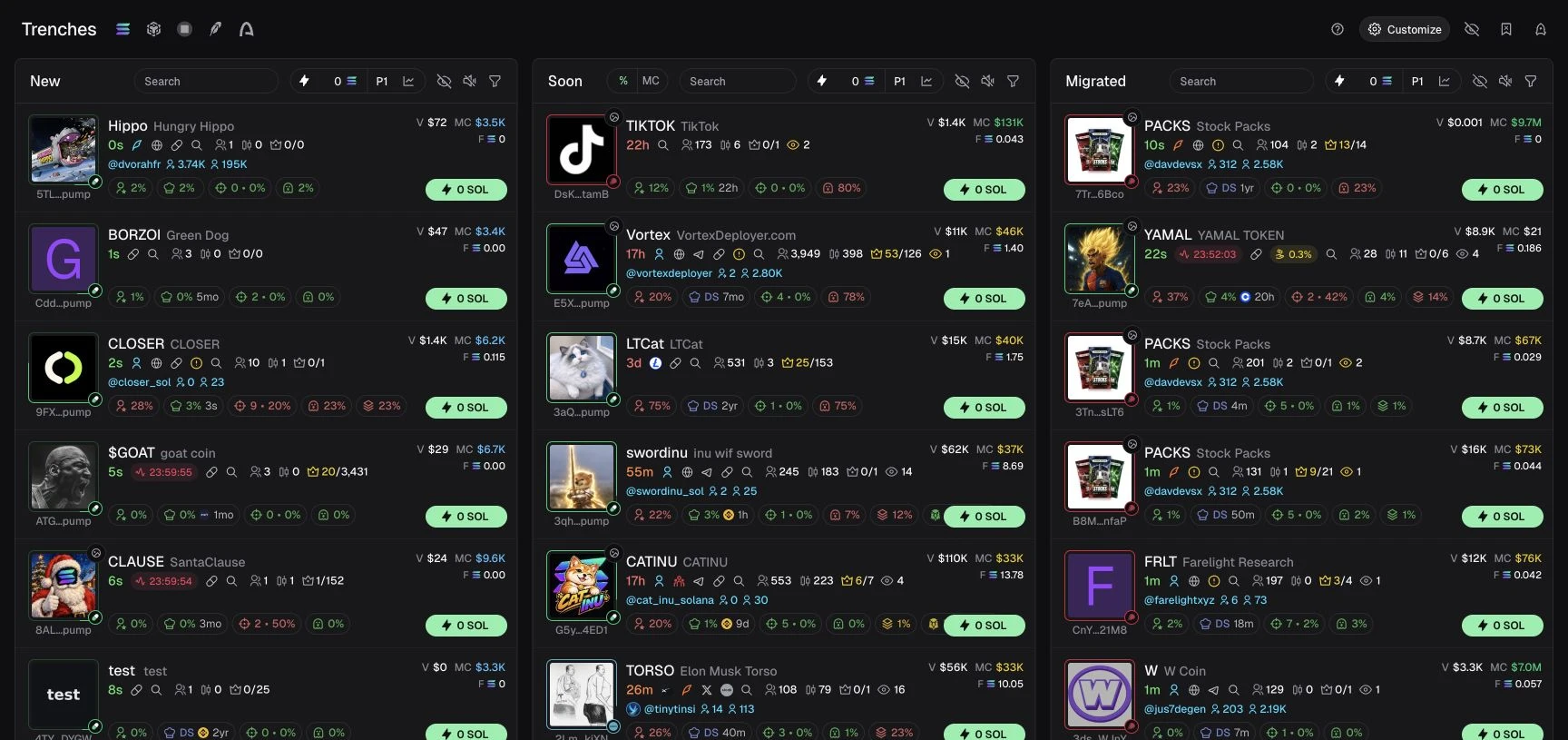
Discovery and tracking workflow
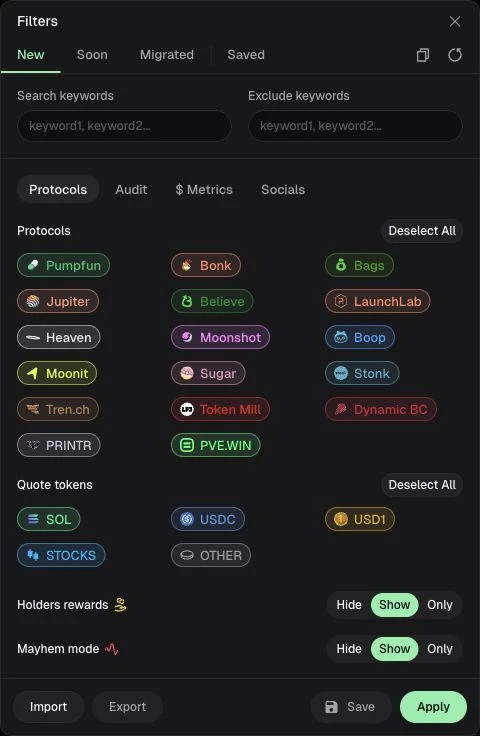
Trenches separates new tokens, tokens approaching migration and migrated tokens. Its Solana filters include named protocols, quote-token categories, holder rewards and Mayhem settings. A launchpad in a discovery filter is not automatically an executable integration or a sniper target.
The tracking views include wallet and KOL management, live trades, transfers, tracked X accounts and an X feed. Settings expose developer, token and handle blocklists; the developer list shows a capacity of 1,000 addresses.
Terminal vs Other Solana Trading Terminals
Compare Terminal with other Solana trading terminals like Photon, BullX Neo, Axiom and more. The tool below preselects Terminal automatically, so you only need to choose one other terminal to start the comparison.
How to use Terminal (Padre.GG)
Use this sequence for Solana: open the terminal, select Solana, confirm the trading wallet, then find the token by its contract address. Review the amount, slippage, fees and order type before confirming. The sections below explain each step; the Solana on-chain trading guide covers the underlying workflow.

Start with Terminal
Open the current Terminal web entrypoint and follow the sign-in options it offers. Select Solana before inspecting a token or wallet. Verify the domain and current setup instructions before transferring funds.

Wallet setup
The wallet manager offers Create and Import controls, while wallet groups and multiple-wallet execution settings are recorded. Key export, recovery and custody guarantees are not established by this review. The website advertises Turnkey infrastructure and 2FA, but those descriptions are not a security audit.
The current web interface offers English and Chinese. Full PWA/native-mobile, desktop or Telegram trading support remains unconfirmed. Current perpetuals availability, leverage and perpetuals fees are also unconfirmed for the Padre product family. Missing evidence is not evidence that a feature is unavailable.
The former docs.padre.gg address currently leads to the product instead of documentation. Archived Padre material is historical context.
For a side-by-side workflow comparison, read Axiom vs Terminal on Solana. Return to the Solana bot directory to compare other current products.

Deposit funds
Select Solana and confirm which trading wallet will receive the funds. Read the receiving address in the product and compare it with the destination in your sending wallet before approving a transfer. A matching account name is not an address check.
Use SOL on Solana, start with a small transfer and confirm that the balance appears in the intended trading wallet. Keep network and execution costs separate from the amount you intend to trade. A balance on another chain is not Solana funding.
The visible Create and Import controls do not establish recovery or key-export guarantees. Resolve those questions using current official instructions before funding the wallet.

Terminal trading
Use market orders for fast entries and limit orders when you need more control. Execution quality depends on liquidity and settings like slippage and fees, not just the terminal.

Buying Solana Tokens
- Select Solana and find the token by its mint address. Compare the address on the token page with the one you intended to open; a shared ticker is not enough.
- Choose the trading wallet, then distinguish an immediate Market order from a conditional Buy Dip order or a scheduled DCA order.
- Review the amount, liquidity and quoted outcome. Check slippage, priority fee, tip and MEV mode in the selected preset before confirming.
- After submission, inspect the transaction result and wallet balance. A pending instruction or a discovery listing is not proof that tokens were bought.

Selling Solana Tokens
Open the intended Solana position and confirm the wallet holding it. For a market sale, review the token amount or position percentage and the quoted result before submitting.
For a Take Profit or Stop Loss order, check the trigger and the amount to sell separately. A trigger describes when an order should attempt execution; it does not guarantee the final price. The observed Take Profit control supports selling a percentage of the position.
For DCA, review total value, slices, interval and minimum/maximum market-cap conditions. Recheck pending orders after a sale instead of assuming every other exit was cancelled. Terminal’s automatic cancellation semantics and multiple-exit rules remain unconfirmed.
Best Terminal (Padre) Alternatives (Solana)





Terminal (Padre) FAQ
Quick answers about Padre (now branded as Terminal), trading setup, fees, execution settings, safety, and common questions.
What is Padre (Terminal)?
Terminal is the current name of Padre or Padre.GG. On Solana, its verified web workflow includes Trenches discovery, wallet tracking, Market, Buy Dip, Take Profit, Stop Loss and DCA controls.
Is Padre a Telegram trading bot?
Terminal’s web app is confirmed at trade.padre.gg. Standalone Telegram trading remains unconfirmed; the web interface alone does not establish whether a separate Telegram trading surface exists.
Why is Padre sometimes called a bot?
“Bot” is sometimes used broadly for on-chain trading tools. Terminal is confirmed as a web trading terminal; that label does not establish automatic copy trading, sniping or a standalone Telegram product.
Which chains does Padre support?
Current trading is recorded for Solana, Ethereum, Base, BNB Chain and Robinhood. Arc has an observed discovery view and order form, but trading remains unconfirmed. TRON, HyperEVM and Monad support is also unconfirmed. Select the intended chain in the app; features can differ by network.
Does Padre have fees?
Terminal advertises a platform fee of up to 1%; an exact universal or Solana-specific rate is not established. Network fees, priority fees, validator tips and DEX/protocol charges remain separate. Slippage is an execution-price difference, not the platform fee.
Does Padre offer cashback or fee rebates?
Public cashback is up to 35%. Referral commission is a separate offer of up to 40% of referred platform fees. Neither maximum guarantees an account rate or a signup benefit. Cashback applies to eligible fees, not the full trade amount; check current account terms.
What are recommended settings for beginners?
Review the Solana order type, wallet, slippage, priority fee, tip and MEV mode. The audit did not establish a universal safe preset or guaranteed execution quality.
Why do trades fail on Padre?
Check the reported error, selected wallet, SOL balance, available liquidity and order conditions. Do not retry by automatically raising slippage: that permits a worse price and does not resolve every failure. Confirm the previous transaction status before submitting another order.
What is slippage and why does it matter?
Slippage is the difference between your expected price and the actual fill price. Higher slippage increases fill probability but can result in worse execution.
Does Padre protect against MEV or sandwich attacks?
Terminal’s Solana settings show off/secure MEV modes, manual priority fees, slippage, a tip control and a custom RPC field. Those controls do not prove private routing, Jito infrastructure or guaranteed protection from MEV or sandwich attacks.
How do I add funds to my Padre trading wallet?
Use the wallet or deposit section inside Terminal to verify the receiving address and Solana network before sending funds. Confirm current recovery instructions first; a wallet control is not a custody guarantee.
Can I access or export my private key when using Padre?
Current key-export and account-recovery procedures are unconfirmed. The wallet manager exposes Create and Import controls; that does not establish key ownership, export access or recovery guarantees. Check the current official product instructions before funding a wallet.