
FEES • SETTINGS • SAFETY
Bloom Trading Bot & How To Use (2026)

What is Bloom (Telegram bot)?
Bloom is a Solana Telegram trading bot designed for fast token trading,
copy trading and Social tasks inside Telegram, with Manager and extension access.
In the Telegram workflow, users can buy and sell tokens
by sending a contract address, ticker or supported link to the bot.
Trades execute onchain using configurable settings such as slippage,
priority fees and position sizing. Bloom also operates a separate
EVM Telegram bot for chains such as Ethereum and Base.
Trading safety basics
Trading through Telegram bots such as Bloom involves execution risk.
Fast token launches, low liquidity pools and aggressive slippage
settings can lead to poor fills or failed transactions.
Always verify token contracts before trading and start with small
test trades. Only interact with the official Bloom bot and avoid
sponsored Telegram ads or fake support accounts.
Why traders use Bloom
Bloom is popular among Solana traders because it combines
fast Telegram execution with tools such as wallet tracking,
copy trading and token discovery.
In the Telegram workflow,
users can monitor tokens and execute trades directly inside Telegram.
Many traders use Bloom during new token launches where
speed and simple workflows matter more than advanced charting.
Execution settings such as slippage and priority fees
can increase the probability of successful fills.
- Best for: traders who prefer a Telegram-native Solana trading workflow.
- Main use cases: liquidity/migration sniping, copy trading, AFK/Social tasks and manual entries.
- Not ideal for: users needing verified exclusive key-control or recovery guarantees.
- Main risks: slippage, low liquidity tokens and aggressive execution settings.
Bloom also offers optional features such as cashback rewards
and a browser extension used to detect tokens and wallets
while browsing external trading platforms.
Popular alternatives:
BONKbot · Trojan Telegram Bot · Maestro
Active trading chains
Solana, Ethereum, BNB Chain, Base, HyperEVM, Robinhood, Arc and Ink.
Chain status checked: 7 October 2026. Features and entry routes vary by chain; this guide focuses on Solana.
Bot language (SOL bot) English, Chinese (中文), Russian Bot language (EVM bot) English
Bloom Telegram bot: quick overview
Bloom is a Solana Telegram trading bot built for fast token trading, copy trading, and wallet tracking directly inside Telegram. Traders can execute swaps using configurable settings such as slippage tolerance and priority transaction fees.
Current Bloom token trading covers Solana and seven EVM chains: Ethereum, BNB, Base, HyperEVM, Robinhood, Arc and Ink. Monad appears in historical/bridge/reward documentation; current Monad trading remains unconfirmed.
At a glance
| Product type | Telegram trading bot focused on Solana token trading, wallet tracking, and copy trading. |
|---|---|
| Supported chain | Solana (SOL). |
| Other Bloom Telegram bots | Bloom EVM bot (Ethereum, BNB, Base, HyperEVM, Robinhood, Arc and Ink). |
| Trading fee | 1% standard platform fee; 0.9% referred discount; network/protocol/bridge costs separate |
| Referral discount | Users who sign up through a referral link receive a reduced fee of 0.9% (10% discount) instead of the standard 1%. |
| Referred cashback | 10% referred fee cashback; stacking with the 10% discount unconfirmed |
| Trading interface | Manager web/PWA, chain-specific Telegram bot and unified browser extension |
| Core features | Manual token trading, wallet tracking, copy trading, token discovery tools, and wallet management inside Telegram. |
| Execution controls | Adjustable slippage tolerance, priority fee settings, presets, and wallet selection for faster transaction confirmation. |
| Browser extension | Unified browser extension with its own buy/sell and active-order overlay; settings are managed in Bloom Manager. |
| Wallet handling | Custody architecture unconfirmed; generated/imported wallets do not establish exclusive user key control |
| Bot language (SOL bot) | English, Simplified Chinese and Russian · Solana Telegram |
| Bot language (EVM bot) | English observed; additional EVM translations unconfirmed |
| Official links |
Disclosure: Telegram bot links include our referral.
Checked against Bloom documentation and bot interface:
|
Bloom trading fees and rewards
Platform fee and transaction costs
Bloom’s standard token buy/sell fee is 1%. Signing up through a referral reduces that platform fee to 0.9%. Network gas, priority fees or validator tips, protocol/DEX costs and bridge fees are separate. Referred cashback is 10% of eligible standard fees; the net result when combined with the discount remains unconfirmed.
Cashback and referral rewards
The standard referral commission has three layers: 25%, 3% and 2% of the published fee basis. It is a referrer benefit, separate from the trader’s cashback. Higher partner rates and a general cashback maximum are unconfirmed. No combined 0.8% or 0.81% net platform rate is promised.
Bloom surfaces and launchpad roles
Manager, Telegram and the extension
BloomSolana_bot is the Solana Telegram entrypoint. Manager is the shared web hub for tasks, wallets, portfolio and chain-scoped history. Its mobile version can be added to the home screen. The unified extension has its own trading overlay; it is more than a link back to Telegram.
Launchpad roles
Token trading: Pump.fun, LaunchLab, Moonshot, Moon.it, Boop, Dynamic BC (selected confirmed examples).
AFK platform filtering: Pump.fun, LaunchLab, Moonshot, Moon.it, Boop, Mayhem (selected confirmed examples).
Native token launch: Pump.fun, Bonk.fun, Bags.
Bloom Solana orders and execution settings
Reviewed 7 October 2026
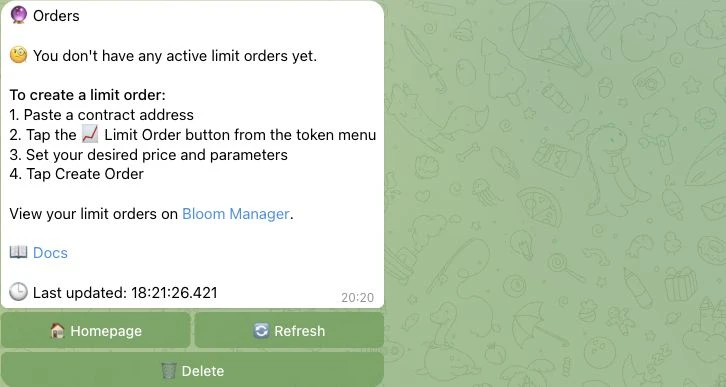
The Solana bot combines liquidity/migration sniping, wallet copy trading, AFK platform matching and Social tasks. These are different execution workflows: an AFK platform filter does not establish a sniper integration for that launchpad. Partial exits, take profit, stop loss and trailing strategies are documented.
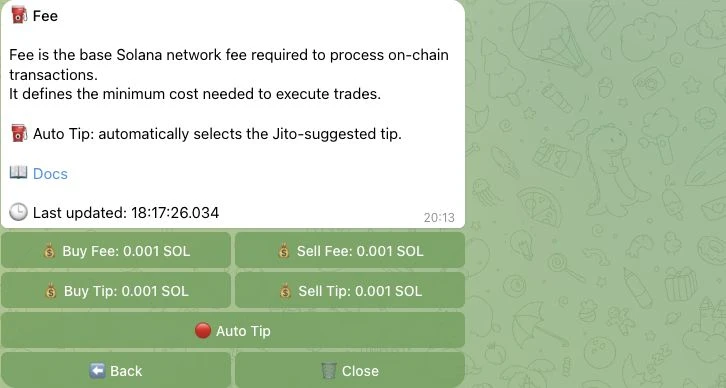
The Solana settings separate buy/sell network fees from validator tips, with Auto Tip and slippage controls. Protected-processor routing is configurable; a protection control does not guarantee a sandwich-free fill. The quote menu offers SOL, USDC and USD1.
Bloom vs Other Solana Telegram Trading Bots
Compare Bloom with other Solana Telegram trading bots like BONKbot, Trojan, Maestro and more. The tool below preselects Bloom automatically, so you only need to choose one other Telegram bot to start the comparison.
How to use Bloom Trading Bot for Solana

Start with Bloom
Bloom Manager provides web/PWA access alongside the Solana Telegram bot and its Solana execution controls. The unified extension can execute from its trading overlay.
Pin the bot in your Telegram chats for quick access during fast token launches or volatile markets.

Wallet setup
Generated/imported multi-wallet workflows are confirmed. Manager supports wallet archive, split and consolidate. The technical custody, exclusive key-control and recovery architecture are unconfirmed; key access is not presented as proof of exclusive custody. The Solana Telegram interface supports English, Simplified Chinese and Russian. Manager Social Tracker translation targets are English and Chinese; these are translation roles, not promises about help/support languages.

Add SOL to Trading Bot
Open the wallet section to view your Solana wallet address. Tap the address to copy it.
Send SOL to this address. Once confirmed,
your balance appears and you can start trading.

Wallet recovery and custody
Follow the recovery instructions shown in the official Bloom wallet flow. The technical custody model, exclusive key control and recovery guarantees were not independently established; do not infer them from a wallet-generation or import button.

Buying Solana Tokens
Buy tokens by sending a token address, ticker, or supported link to the Bloom bot.
Trades use your configured slippage and priority fee settings; execution timing and successful fills are not guaranteed.

Selling Solana Tokens
Sell tokens from the positions view or directly through the trading commands inside the bot. Portfolio tracking is available inside Telegram. Always test with small trades on new tokens.
Best Bloom Bot Alternatives (Solana)





Bloom Trading Bot FAQ
Common questions about Bloom, copy trading, fees, safety, and how the Telegram trading bot works on Solana.
How does Bloom work?
Bloom uses Telegram, Manager web/PWA and a unified extension. Wallets, tasks and execution settings remain chain-scoped.
Is Bloom a web trading platform?
Bloom Manager is the current web hub, with a mobile Add-to-Home-Screen surface and a unified trading extension. Telegram remains available through separate Solana and EVM bots.
How do I add funds to my Bloom wallet?
Open the Bloom bot and go to the wallet section to view your Solana wallet address. Copy the address and send SOL to it from your wallet or exchange. Start with a small test deposit before trading.
Does Bloom charge trading fees?
Yes. Bloom charges a standard 1% trading fee on every buy and sell transaction. Users who join through a referral link receive a reduced fee of 0.9%.
Does Bloom offer cashback?
Referred users receive 10% cashback on eligible standard fees. The net rate when stacked with the referral discount remains unconfirmed.
What is copy trading in Bloom?
Copy trading allows you to follow other wallets and automatically mirror their trades. Bloom also supports wallet tracking features that help users monitor trader activity before copying.
Is copy trading safe?
Copy trading involves risk. Followed wallets can underperform, trade illiquid tokens, or exit unexpectedly. Always start with small amounts and monitor performance before increasing allocation.
How does the Bloom browser extension work?
The Bloom browser extension helps detect tokens and trading opportunities faster on external platforms. The unified extension has its own buy/sell and active-order overlay, with settings in Manager.
What chains does Bloom support?
This guide covers Bloom on Solana. Bloom also supports trading on Ethereum, BNB Chain, Base, HyperEVM, Robinhood, Arc and Ink. Use the entry route for the relevant chain.
Can I use multiple wallets in Bloom?
Yes. Bloom supports wallet creation and wallet management inside the bot. Users can create or import wallets and use dedicated trading wallets for different strategies.
What languages does Bloom support?
The Solana Bloom bot supports English, Chinese, and Russian. English was observed in the EVM walkthrough; additional EVM translations remain unconfirmed.
What happens if I lose my Bloom private key?
Follow the current official wallet recovery instructions. The audit did not establish technical custody, exclusive key control or recovery guarantees; it did not reveal or export private keys.
