
FEES • SETTINGS • SAFETY
MEVX Trading Review & How To Use (2026)

What is MEVX (Solana trading terminal)?
MEVX is a Solana trading terminal designed for fast token discovery, chart monitoring, and manual trading from a single browser interface.
MEVX combines a web terminal and a separate Telegram trading surface. This guide focuses on the confirmed Solana workflow; shared wallets and account history between surfaces remain unverified.
The web terminal groups token discovery, charts and wallet monitoring. The audit records available controls without claiming measured latency or guaranteed fills.
Trading safety basics
Trading terminals and Telegram bots can lose money quickly, especially during fast Solana token launches.
Always use a fresh trading wallet, verify token contract addresses before trading, and start with small test trades.
Keep slippage conservative until you understand how the platform behaves. Execution settings can improve speed,
but they do not guarantee protection against bad fills, MEV activity, or scam tokens.
Why traders use MEVX
MEVX brings Solana discovery and order controls into one web terminal, alongside an official Telegram trading bot. Manual orders and documented automation are separate workflows.
The Solana workflow includes manual orders, scheduled DCA, copy execution and targeted or mass sniping. Use the mode whose sizing and trigger semantics match the intended order.
This guide uses Solana-specific evidence. EVM routing, launchpad lists and Telegram parity are not assumed from the Solana controls.
- Best for: traders who prefer a fast web terminal for manual Solana trading.
- Main use cases: token discovery, quick manual entries and exits, and wallet monitoring.
- Automation scope: copy trading and Telegram trading are documented; feature parity must be checked for the selected chain.
Popular alternatives:
Axiom Trade · Photon · BullX NEO
Active trading chains
Solana, Ethereum, BNB Chain, Base, Monad, Robinhood. Avalanche, MegaETH, Mantle, TON, Sui, XLayer and Plasma are discontinued; TRON remains disabled in the current record.
Chain status checked: September 29, 2026. Features and entry routes vary by chain; this guide focuses on Solana.
App language English, 简体中文, Português, Русский, Việt Nam, 한국어, 繁體中文
MEVX: quick overview
MEVX is a web-based crypto trading platform and terminal designed for fast token discovery, manual trading, and automated strategies. While MEVX supports multiple chains, this guide focuses on MEVX for Solana (SOL), where many traders use the platform for quick entries, token monitoring, and execution tools inside a single browser interface.
At a glance
| Product type | Web trading platform (manual trading + optional copy trading tools) |
|---|---|
| Supported chains (in-app) | Solana, Ethereum, BNB Chain, Base, Monad, Robinhood. Status checked: September 29, 2026. |
| Login options | Telegram connect, Google login, wallet connect |
| Core use cases | Instant buy/sell trading, fast token discovery, wallet tracking, and copy trading automation |
| Execution settings | Slippage control, priority/tip-style execution settings (chain-dependent), spend limits and filters for Copy Trade |
| Trading fees | Beginner 0.90%; Silver 0.85%; Gold 0.80%; Platinum 0.75%; Diamond 0.70%. Gross platform fees, before separate cashback and execution costs. |
| App languages | English, 简体中文, Português, Русский, Việt Nam, 한국어, 繁體中文 |
| Official links |
Disclosure: The website and Telegram links include our referral.
Checked against official docs + in-app UI:
|
MEVX trading fees & costs
MEVX trading fees depend on your account rank or points inside the platform.
Total cost includes the gross platform fee and any separate network, priority, tip or protocol charges; execution price can also move.
- MEVX transaction fee: the fee rate depends on your rank or points and is applied consistently across chains.
- Network gas: you still pay the normal network transaction fees for the chain you trade on (for example Solana or EVM chains).
- Priority fee: an extra fee used to speed up confirmations during network congestion. This can improve fill speed but does not guarantee execution.
- Tip: optional tip settings used in fast execution flows such as sniping or high-competition token launches.
- Slippage: often the largest “hidden cost”, especially on low-liquidity tokens or during fast market moves.
Slippage, liquidity and execution settings can materially affect the trade outcome in addition to the platform fee.
Start with conservative settings and only increase speed or tip after testing small trades.
Review MEVX settings before an order
No universal preset guarantees safe or successful execution. Review the controls for the specific Solana order type.
- Use a dedicated trading wallet: don’t trade from your main wallet; keep balances small.
- Slippage: start low; only increase if trades fail during real volatility.
- Priority fee: leave at default first; increase only when the network is busy.
- Tip: keep off / minimal until you understand when it actually helps (mainly high-competition entries).
- Position sizing: start with small test buys, then scale after you confirm fills are acceptable.
- Chain switching: trade one chain at a time until you understand how fees + liquidity differ across networks.
If your fills are consistently bad: reduce size, avoid ultra-thin liquidity tokens, and keep slippage controlled.
Advanced MevX tools & execution considerations
MEVX includes fast execution features such as sniping, limit orders, and automation options.
These can improve control, but they also increase execution risk if your settings are too aggressive.
- Sniper modes: high-competition trading where slippage, tip, and priority fee have the biggest impact.
- Anti-MEV options: designed to reduce MEV/front-run risk (helpful, not a guarantee).
- Auto buy / automation: convenience features that still rely on your slippage + execution parameters.
- Limit orders: great for planned exits, but can fail or fill worse in fast moves and thin liquidity.
Quick rule: master manual execution first, then add advanced tools with small size.
More tools does not automatically mean better results.
MEVX vs Other Solana Trading Terminals
Compare MEVX with other Solana trading terminals like Photon, BullX Neo, Axiom and more. The tool below preselects MEVX automatically, so you only need to choose one other terminal to start the comparison.
How to use MevX

Start with MevX
Open the current MEVX web or Telegram entrypoint and select Solana. The documented login options include Telegram, Google and wallet connection. Review current wallet and recovery instructions before funding; technical custody remains unresolved.

Wallet setup
MEVX documents generated wallets and multiple-wallet controls. Private-key import is unresolved because the current help and terms conflict. Do not treat the wallet selector as proof of key custody, export or account synchronization.

Deposit funds
To start trading, add funds to your MevX trading wallet. Click on your profile (top right), select Wallets, and fund the wallet you want to trade from. Always start with a small test deposit.

MevX trading
Trading on MevX is straightforward. Select a token to view charts, liquidity, and distribution data. On the right side, you can place quick buy or sell orders using MevX’s built-in trading panel.

Buying Solana Tokens
MevX includes its own token discovery and live pair listings. This allows you to find and buy new Solana tokens directly inside the platform without relying on external Telegram channels.

Selling Solana Tokens
To sell tokens, open the token page and use the sell options to exit your full position or a percentage of your holdings. Advanced options such as partial sells and automation are available depending on the token and chain.
Best MevX Alternatives (Solana)





MEVX Trading FAQ
Quick answers about MEVX trading, login & wallet setup, fees, slippage, priority/tip settings, supported chains, and platform safety.
What is MEVX?
MEVX is a trading product family with web and Telegram surfaces. The Solana web terminal combines discovery, manual orders, DCA, copy trading and sniper controls; feature availability varies by chain.
Is MEVX a Telegram trading bot?
MEVX has both a web terminal and an official Telegram trading bot. Telegram is not only a login method. Exact wallet and order-history synchronization between the surfaces remains unverified.
Is MEVX available for Solana?
Yes. MEVX is widely used for Solana trading and this guide focuses specifically on the Solana version, including execution settings and risks.
Does MEVX support copy trading?
Yes. MEVX offers automated copy trading, allowing users to mirror trades from selected wallets with configurable buy, sell, and auto-sell settings.
What chains does MEVX support?
MEVX active trading chains are Solana, Ethereum, BNB Chain, Base, Monad, Robinhood. Avalanche, MegaETH, Mantle, TON, Sui, XLayer and Plasma are discontinued; TRON remains disabled in the current record. Features vary by chain.
How do I log in to MEVX?
You can log in using Telegram connect, Google login, or by directly connecting a compatible wallet.
Does MEVX create a wallet for me?
MEVX documents generated wallets and one-time key disclosure. Technical custody, later export and current import availability remain unresolved; the wallet help and terms conflict.
What fees does MEVX charge?
MEVX publishes a uniform rank schedule across active chains: Beginner 0.90%, Silver 0.85%, Gold 0.80%, Platinum 0.75% and Diamond 0.70%. Cashback and referral commission are separate; network and DEX/protocol costs are additional.
Why do trades fail on MEVX?
Failed trades are usually caused by low slippage settings, fast price movements, or thin liquidity especially during new launches.
Is MEVX safe to use?
MEVX is widely used but carries execution risk like any on-chain trading platform. Always use a dedicated trading wallet and start with small amounts.
Is MEVX better than BullX or GMGN?
MEVX focuses more on web-based execution and copy trading, while platforms like BullX or GMGN may offer different discovery tools or workflows. The best choice depends on your trading style.
Is MEVX suitable for beginners?
MEVX is better suited for users who already understand on-chain trading basics. Beginners should start with small trades and conservative settings.

MEVX on Solana: current controls and limits
MEVX audit reviewed . Scope varies by field; no live trade was tested.
From discovery to a Solana order
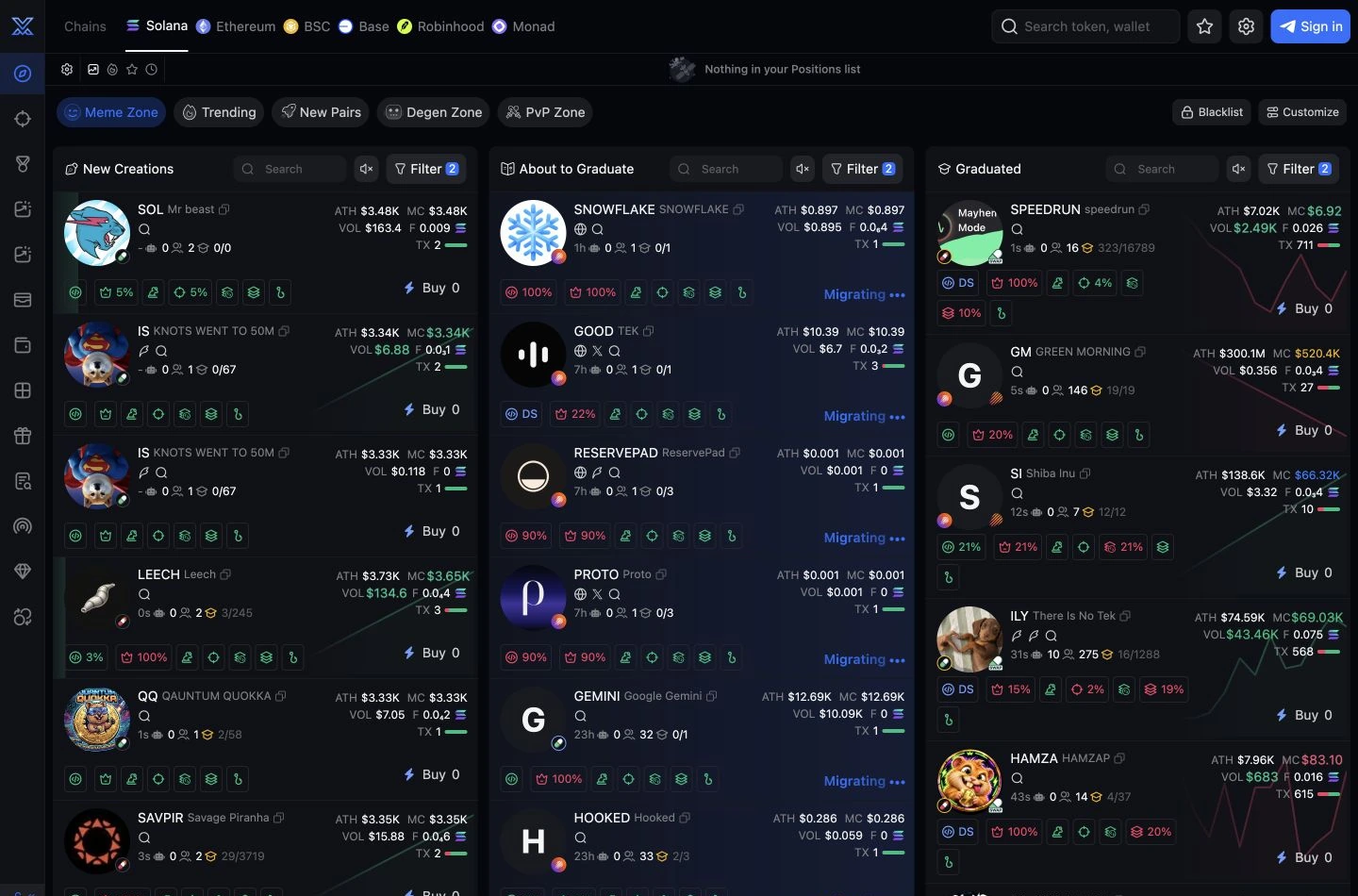
The current terminal separates New Creations, About to Graduate and Graduated feeds. Launchpad and protocol filters narrow discovery; selecting a filter does not prove a trading or sniper integration. Token pages expose holder analytics and a bubble view.
DCA, exits and copy execution
Solana exposes market, limit and DCA order controls. DCA divides a total buy or sell into at least two scheduled orders, with an interval and optional market-cap bounds. Auto TP/SL uses a signed trigger percentage, the percentage of the position to sell and an expiry; multiple exits can be configured before the buy. Copy trading replicates selected-wallet orders; wallet alerts alone do not.
What the Solana sniper control means
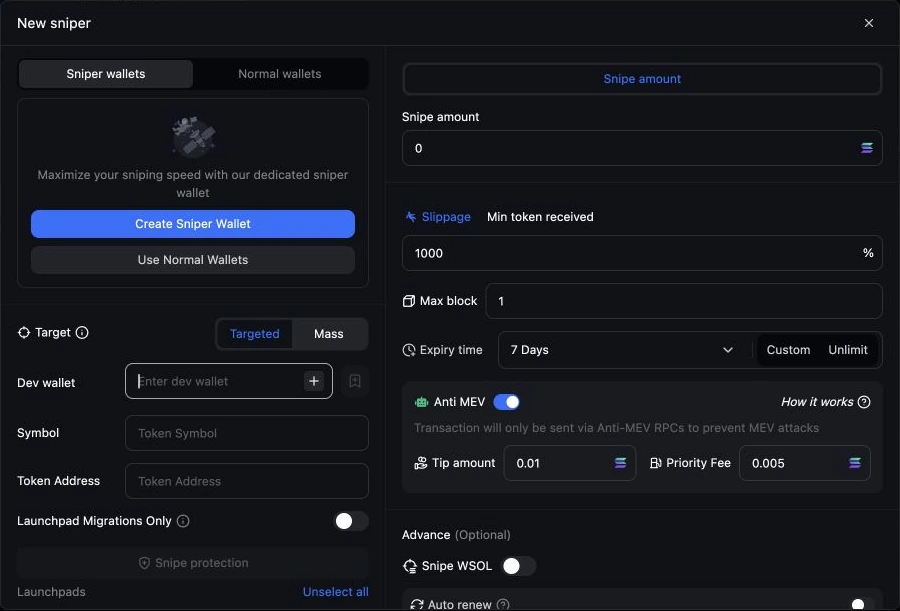
The current New sniper form explicitly lists Pump.fun, Mayhem, LetsBonk, LaunchLab, Wen.dev, Bankr, Surge, DBC, Jup Studio, Bags, Believe, Printr, Daos.Fun and Moonshot as selectable targets. In this sniper flow, Anti MEV routes through anti-MEV RPCs only; with it off, anti-MEV and normal RPCs submit in parallel. The UI states that only the first confirmed route charges tip/priority fee and that the sniper tip is success-only. This is a documented control, not a guarantee against MEV or a measured latency result.
Automation has separate limits
Solana Auto Mode covers slippage, priority fee and tip with a maximum-fee cap. Sniper Auto Renew reuses the setup when conditions reset, with count/spend stopping limits. These controls do not establish a product-wide retry engine. AFK trading is a separate trigger/filter/action workflow.
Rank-based platform fee
0.90% at Beginner rank, falling to 0.70% at Diamond; cashback may reduce effective cost further.
| Rank | Gross trading fee | Cashback share of eligible fees |
|---|---|---|
| Beginner | 0.90% | 6% |
| Silver | 0.85% | 9% |
| Gold | 0.80% | 15% |
| Platinum | 0.75% | 24% |
| Diamond | 0.70% | 35% |
The gross platform fee follows the account rank across active chains. Cashback is a share of eligible fees; referral commission is a separate benefit. Network gas, priority fees, validator tips and DEX/protocol charges are additional where applicable.
L1 referral commission is 17–25% of referred platform fees by rank; it is not cashback on your own trade. Lower referral layers and bespoke discount stacking remain unverified.
Wallet and account limits
Technical custody and key access remain unverified: current wallet help and terms conflict over private-key import. Shared web/Telegram wallets, positions and order history are also unverified.