
FEES • SETTINGS • SAFETY
Sol Trading Bot Review & How To Use (2026)

What is Sol Trading Bot?
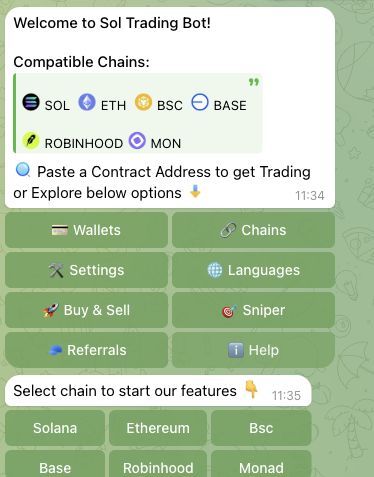
SolTradingBot uses one Telegram bot across Solana, Ethereum, BNB Chain, Base, Robinhood Chain and Monad. This guide covers its Solana workflow. The current menus expose swaps, limits, trailing stop, Sniper V2 and copy-trading setup. A Chrome extension is also advertised; its runtime was not inspected.
Base guide · Ethereum guide · BNB Chain guide · Robinhood Chain guide · Monad guide
Trading safety basics
Trading through Telegram bots can involve higher execution risks, especially during fast token launches and low-liquidity markets.
Always use a dedicated trading wallet, verify token contract addresses before buying, and start with small test trades until you understand how the bot executes orders.
Keep slippage settings conservative and avoid trading unknown tokens during extreme volatility.
Fast execution improves speed but does not eliminate the risk of bad fills or scam tokens.
SolTradingBot workflows
The Telegram interface combines token panels, configurable buy/sell presets and Sniper V2. Limit exits expose TP/SL, partial percentages and trailing-delta controls. Wallet selection, token search and own-position PNL provide context around these workflows.
Priority fee, Jito tip and slippage controls are separate. A visible control does not guarantee execution speed, fill quality or MEV protection. Current DCA creation and dedicated external-wallet tracking remain unverified.
Supported chains

This guide: Solana. Other-chain settings and fees can differ.
Popular alternatives:
BONKbot · Trojan Telegram Bot · Maestro
Sol Trading Bot: quick overview
SolTradingBot combines a primary Telegram surface with an advertised Chrome extension on Solana. Current Telegram controls include market swaps, limits, TP/SL, trailing stop and Sniper V2.
The recorded Solana spot/manual platform fee is 1%. Solana network fees, priority fees, Jito tips and DEX/protocol costs are separate. The product-wide ceiling is 1%; exact rates on the five new chains remain unverified. Cashback and possible volume discounts must not be treated as a confirmed reduction to the gross fee.
Custody and exclusive key control, technical private routing and current DCA creation remain unverified. The Chrome extension is currently advertised; its runtime and Telegram feature parity were not tested.
At a glance
| Guide network | Solana |
|---|---|
| Active product networks | Solana, Ethereum, BNB Chain, Base, Robinhood Chain and Monad |
| Platform trading fee | 1%; network, priority, Jito and venue costs separate |
| Surfaces | Telegram inspected; Chrome extension advertised, runtime unverified |
| Orders | Market swaps, limit buy/sell, TP/SL, partial exits and trailing stop |
| Copy trading | Target-wallet setup inspected; activated replication untested |
| DCA | List exists; current creation unverified |
| Wallets / custody | Generated/imported multi-wallet workflows; custody and exclusive key control unverified |
| Languages | English inspected; other flag selectors advertised |
| Official Telegram route | Open SolTradingBot |
Reviewed 28 October 2026. The earlier Solana review is retained and updated in place; trading controls were inspected without executing orders.
Sol Trading Bot fees and costs
The recorded Solana spot/manual platform fee is 1%. Solana network fees, priority fees, Jito tips and DEX/protocol costs are separate. The product-wide ceiling is 1%; exact rates on the five new chains remain unverified. Cashback and possible volume discounts must not be treated as a confirmed reduction to the gross fee.
Cashback and referral shares describe rewards from eligible fees; they are not included network costs or a guaranteed net trading rate. Slippage and price impact are separate execution outcomes.
Referral, cashback and languages
The referral dashboard advertises a standard 30% referrer share “forever” and a SOL-denominated display. Existing exact evidence records cashback as 20% of paid fees; that older rate evidence was retained at its original date. The current cashback dashboard uses USD-equivalent display. Settlement currency, stacking and exact monthly reset rules remain unverified. Neither reward share is the platform trading fee.
English was inspected in Telegram. Chinese, Russian, Portuguese and Vietnamese flag selectors are advertised, but complete translated workflows and support languages were not tested.
Sol Trading Bot settings and presets
Priority fee, Jito tip and slippage
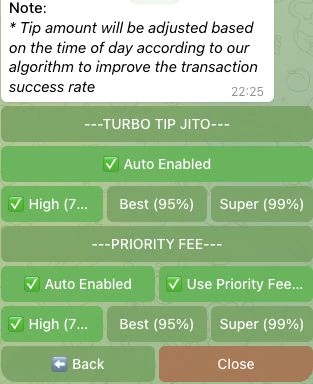
Priority Fee and TURBO TIP/JITO are separate controls, with auto adjustment and High/Best/Super presets. Buy/sell and sniper slippage are configured separately. Anti-MEV Sniper and Anti-MEV Buy/Sell are distinct controls; efficacy and private relay design remain unverified.
Sol Trading Bot orders, sniping and venue coverage
Swaps, limit exits and trailing stop
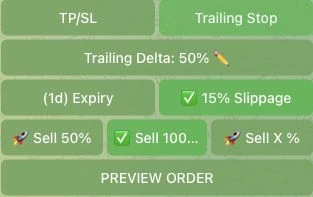
Token panels expose market swaps and limit buy/sell controls. Sell limits offer TP/SL or Trailing Stop, a trailing-delta field and percentage-based partial exits. Sniper TP/SL supports up to five triggers. Copy Trades exposes execution-wallet selection and target-wallet setup; activated replication was not tested. A DCA list exists, but no DCA creation tab appeared in the two inspected venue panels.
Sniper V2 launchpad roles
The sniper exchange selector explicitly offers Pump.fun, LaunchLab, Heaven, DBC, Moonshot and Boop.Fun on Solana. These are confirmed sniper configuration relations. “Launchpad Migrations Only” scopes the sniper to migrated tokens on selected DEXs; it is not proof of a separate migration-tracking feed.
Targeted mode uses dev-wallet, token-address and token-symbol conditions. The specific Target form requires at least one condition and matches all supplied conditions. Mass mode is separately offered. No task was activated.
Sparse venue evidence
Orca Whirlpool and Raydium CLMM token panels exposed buy/sell/limit configuration. The sniper selector also lists Raydium V4/CPMM/CLMM, Meteora DYN/DLMM/DAMM V2 and PumpSwap. Selector support is recorded separately from routing architecture or tested execution; this is not a complete DEX matrix.
Sol Trading Bot vs Other Solana Telegram Trading Bots
Compare Sol Trading Bot with other Solana Telegram trading bots like Maestro, Trojan, BONKbot and more. The tool below preselects Sol Trading Bot automatically, so you only need to choose one other Telegram bot to start the comparison.
How to use Sol Trading Bot

Start with Sol Trading Bot
Telegram is the primary inspected trading interface; a Chrome extension is advertised, with runtime unverified.

Wallet setup
The wallet manager offers single and batch creation, wallet selection, transfer-all-to-one and SOL/WSOL utilities. Each wallet bundle now groups a Solana address and an EVM address. The EVM address is shared across the supported EVM networks, with separate balances; Solana uses its own address. Always check the funding network. Custody and exclusive signing control remain unverified. Batch creation of ten wallets does not establish a maximum of ten. The Security menu exposes 2FA and transfer/deletion protection controls; no security setting was changed. Token search accepts name or symbol, and token panels show market/liquidity information. Profile covers the user’s own positions and PNL; a standalone external-wallet tracker is not established.

Add SOL to Trading Bot
After creating your wallet, copy the Solana address shown in the bot. Send SOL to this address to fund your trading wallet. If it’s your first time, start with a small test amount.

Wallet access and key handling
Custody and exclusive key control, technical private routing and current DCA creation remain unverified. The Chrome extension is currently advertised; its runtime and Telegram feature parity were not tested.

Buying Solana Tokens
Open Buy & Sell, or search by token name or symbol, to inspect a token panel. A dedicated new-pairs discovery feed was not established in the current walkthrough.

Selling Solana Tokens
Open the bot and select the token you want to sell. You can sell your full position or a percentage with one click. Portfolio tracking lets you monitor open positions, gains, and losses.
Sol Trading Bot Alternatives (Solana)




Sol Trading Bot FAQ
Current Solana fees, order controls and wallet workflows, with unverified fields stated explicitly.
What is Sol Trading Bot and how does it work?
SolTradingBot is a multichain Telegram trading product. This Solana guide also records its advertised Chrome extension. Telegram exposes swaps, limit-order controls, Sniper V2 and copy-trading setup. Extension runtime was not tested.
Is Sol Trading Bot safe to use?
The interface exposes Anti-MEV and 2FA controls. Protection efficacy, technical custody and exclusive key control remain unverified; observed controls are not a safety guarantee.
Does Sol Trading Bot charge trading fees?
The recorded Solana spot/manual platform fee is 1%. Solana network fees, priority fees, Jito tips and DEX/protocol costs are separate. The product-wide ceiling is 1%; exact rates on the five new chains remain unverified. Cashback and possible volume discounts must not be treated as a confirmed reduction to the gross fee.
Why do trades fail on Sol Trading Bot?
The Anti-MEV panel explicitly notes that a transaction may fail. The walkthrough did not execute transactions or measure failure causes, retries or fill reliability.
What slippage settings should I use on Sol Trading Bot?
Buy/sell and sniper slippage have separate controls. Observed account values are not recommended defaults; the audit did not establish a universal slippage setting.
Does Sol Trading Bot support copy trading?
The current Telegram interface exposes execution-wallet selection and Add Wallet/Add multiple target setup. No copy target was added, and activated replication was not tested.
Can Sol Trading Bot protect against MEV and sandwich attacks?
Separate Anti-MEV Sniper and Anti-MEV Buy/Sell controls are visible. Actual protection efficacy and private routing remain unverified.
How do I set up a wallet in Sol Trading Bot?
Wallets offers Generate New Wallet and batch generation of five or ten. Each wallet bundle now groups a Solana address and an EVM address. The EVM address is shared across the supported EVM networks, with separate balances; Solana uses its own address. Always check the funding network. Custody and exclusive signing control remain unverified. Existing documentation describes private-key import/export. Wallet generation can display secret key material; keep it private.
Is Sol Trading Bot beginner-friendly?
The product has configurable order, sniper, fee and wallet controls. The audit did not measure onboarding time or establish a beginner-friendliness rating.
Which chains does SolTradingBot support?
As checked on 28 October 2026, the shared Telegram bot supports Solana, Ethereum, BNB Chain, Base, Robinhood Chain and Monad. This review covers Solana. Market and limit-order controls were inspected separately on each chain; copy setup, DCA and sniping are not assumed to work on every network.
Can I use multiple wallets with Sol Trading Bot?
The current wallet manager and Sniper V2 expose multi-wallet selection. Batch generation of ten wallets is not evidence of a ten-wallet maximum.
What tokens can I trade using Sol Trading Bot?
Current Solana token panels were inspected on Orca Whirlpool and Raydium CLMM, and the sniper exposes specific launchpad/venue selectors. This does not establish support for every SPL token or guarantee execution.
Is Sol Trading Bot better than using a web trading terminal?
Telegram is the inspected primary workflow. A Chrome extension is advertised, but its runtime and feature parity remain unverified. The audit does not establish an overall winner.
