
FEES • SETTINGS • SAFETY
Maestro Review & How To Use (2026)

What is Maestro?
Maestro is a Solana-focused Telegram trading bot built for fast meme token buys and sells directly from chat.
It’s designed for traders who want a quick execution flow with configurable settings like slippage and priority fees.
Unlike web terminals, Maestro runs inside Telegram and executes trades through your connected wallet. Because execution is fast and chat-driven, configuration mistakes such as slippage or priority fees can significantly affect fills during volatile launches.
Trading safety basics
Trading bots can lose money quickly, especially during fast Solana launches. Use a dedicated trading wallet (never your main holdings wallet), verify token contracts before buying,
and start with small test sizes.
Only use official Maestro links and ignore Telegram ads, “support” DMs, or clone bots. Slippage and priority settings can improve execution speed, but they do not guarantee protection against bad fills or scam tokens.
Why traders use Maestro on Solana
Maestro is a Telegram trading bot for Solana used for fast token buys and sells directly from chat.
It focuses on a Telegram-first workflow where traders execute orders with presets such as
slippage and priority fees instead of using a full web trading terminal.
The bot is commonly used during fast meme token launches where traders need quick execution
without switching between charts, wallets, and trading interfaces. Orders are submitted
directly from Telegram using the connected wallet.
- Best for: active Solana traders who prefer a Telegram-first workflow with reusable execution presets.
- Main risks: slippage during volatile launches, incorrect presets, and wallet/key handling when connecting trading bots.
- Typical use: quick entries and exits, managing open positions, and reacting to new token activity from Telegram.
Note: trading bots improve speed but do not remove risk. Always use a dedicated trading wallet and treat new token launches as high-risk trades.
Active trading chains
Solana, Ethereum, BNB Chain, Arbitrum, Base, Avalanche, Sonic, TRON, TON, Monad, HyperEVM, Robinhood. Arc, Stable and Ink are currently active.
Chain status checked: 7 October 2026. Features and entry routes vary by chain; this guide focuses on Solana.
Bot language English, Chinese (中文)
Popular Maestro alternatives:
BONKbot · Trojan Telegram Bot · Sol Trading Bot
Maestro: quick overview
Maestro is a multi-chain Telegram trading bot used for executing token trades directly from chat. It supports Solana first and also operates on several EVM chains, as well as TRON and TON. Successful trades executed through the bot are charged a 1% trading fee.
On Solana, traders typically configure execution settings such as slippage and priority fees (called Gas Delta in Maestro) to improve transaction inclusion speed during fast token launches.
At a glance
| Product type | Telegram trading bot (multi-chain) |
|---|---|
| Chains | Solana, Ethereum, BNB Chain, Arbitrum, Base, Avalanche, Sonic, TRON, TON, Monad, HyperEVM, Robinhood, Arc, Stable and Ink. Reviewed 7 October 2026. |
| Trading fee | 1% of successful buys and sells, including supported automated orders. Network and protocol fees are separate; ordinary transfers have no Maestro trading fee. |
| How fees are collected | Solana fees are deducted in the same transaction. Other-chain fees can accrue per Telegram account and be collected at a threshold; confirmed examples are 0.5 TON, 1 MON and 10 TRX. Other thresholds are unconfirmed. |
| Priority fee (Solana) | Solana has a small base transaction fee. Maestro allows users to add an optional Gas Delta priority fee to improve confirmation speed during network congestion. |
| Slippage limit | Traders can configure a slippage tolerance in the bot settings. Failed trades during fast launches are often caused by slippage limits that are set too low. |
| Wallet / custody | Custodial: Maestro retains generated/imported keys. Initial key access does not establish exclusive user custody. Standard wallet capacity remains unconfirmed. |
| Official links |
Disclosure: The Telegram bot link is an official Maestro link that includes our referral.
Checked against official docs:
|
Maestro trading fees and rewards
Trading costs
Maestro charges a product-wide 1% fee on successful manual and automated buys and sells. Network gas, priority fees or builder tips, DEX/protocol costs and bridge-provider fees are separate. Ordinary wallet transfers have no Maestro trading fee.
Cashback and referrals are separate
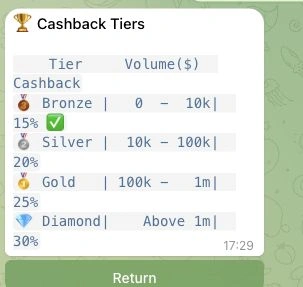
Cashback rebates 15–30% of eligible Maestro platform fees, based on the displayed USD-volume tiers. It is not 15–30% of the trade amount and does not reimburse gas. Exact equality rules at tier boundaries are unspecified. Claims are manual.
| Cashback tier | Displayed volume (USD) | Rebate on Maestro fees |
|---|---|---|
| Bronze | 0–10,000 | 15% |
| Silver | 10,000–100,000 | 20% |
| Gold | 100,000–1,000,000 | 25% |
| Diamond | Above 1,000,000 | 30% |
The standard referral commission is 25% of eligible referred platform fees. It is a referrer benefit, separate from the trading user’s cashback; custom partner rates are not used as standard economics.
Maestro Premium (optional)
Premium is an optional plan, separate from the standard trading fee. Check the current plan terms and supported limits before subscribing; a paid plan does not guarantee execution quality.
Maestro execution settings on Solana
Execution and launch orders
Solana Anti-MEV is optional, with documented Jito, Temporal and NextBlock routing. Gas Delta is a separate priority-fee control. Manual slippage controls are confirmed on Solana. Priority fees are separate from Maestro’s trading fee. AutoSnipe is confirmed in the current Solana selector. The documented Solana sniper scope includes Raydium V4; that does not establish support for every launchpad.
Maestro order controls and launchpad scope
Copy trading and orders
Copytrade is confirmed on Solana. Track Only sends notifications; Copy Sell replicates the target’s sold share and can coexist with independent Auto Sell. Price/market-cap buy limits are distinct from recurring DCA. Solana sell presets confirm take profit, stop loss, trailing stop and partial exits.
Launchpad scope
Confirmed Solana launchpad relations: Pump.fun (trade), Moonshot (trade), LaunchLab (trade). These relation types do not establish an additional sniper integration.
Maestro vs Other Solana Telegram Bots
Compare Maestro with other Solana Telegram trading bots like BONKbot, Trojan, and Bloom. The tool below preselects Maestro automatically, so you only need to choose one other bot to start the comparison.
How to use Maestro

Start with Maestro
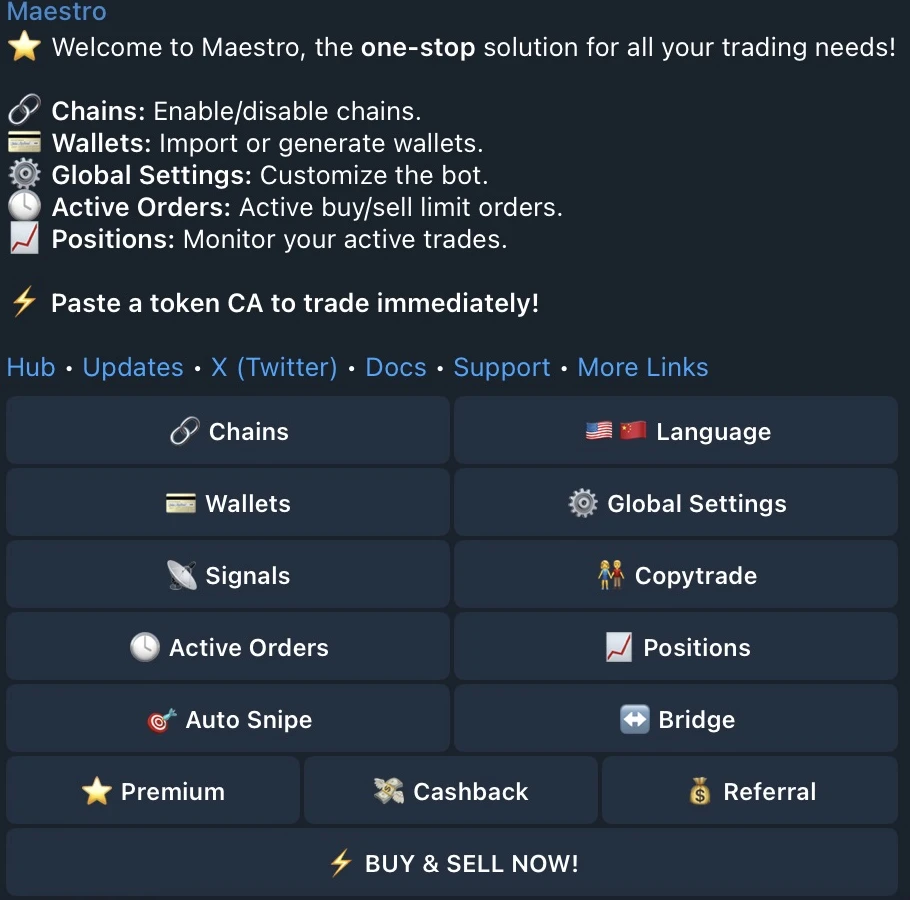
First, open the Maestro bot on Telegram. Click the link below to visit the bot directly. It can be useful to pin the bot in one of your folders so you can find it quickly later.

Wallet setup
Maestro is a Telegram trading bot, including access through Telegram Web. It is not a separate browser trading terminal. Maestro retains generated/imported wallet keys; initial key access does not establish exclusive user custody. Standard wallet capacity is unresolved, so no universal wallet-count promise is made. English and Simplified Chinese interface choices are confirmed; support and content-language coverage is not established.

Create a Wallet
Use Wallet Setup → Generate for the selected chain and follow the recovery instructions shown by Maestro. The audit did not generate a wallet or inspect private key values.

Import a Wallet
If you import a wallet, you’ll need to enter your private key to connect it to the Maestro Telegram bot. Once connected, you’re ready to trade. Use a dedicated trading wallet and avoid importing your main wallet.

Buying Solana Tokens
After you’ve joined a few channels that share fresh pairs and liquidity updates, you can start trading. Paste the token contract address (CA) into Maestro and choose your buy amount. Start small and test first.

Selling Solana Tokens
If you want to sell, open the Maestro Sniper bot and choose sell. You can sell your full bag or a percentage of your position. Maestro also supports auto-sell tools, but test them with small size first.
Best Maestro Sniper Bot Alternatives (Solana)





Maestro Sniper Bot FAQ
A fact-based guide to the Maestro Sniper Bot on Solana: costs, safe defaults, and step-by-step setup.
What is the Maestro Sniper Bot on Solana?
Maestro (often called the Maestro Sniper Bot) is a Telegram trading bot that lets you buy and sell Solana tokens from Telegram, including sniping and automation features.
How much does Maestro cost to use?
Maestro charges a 1% fee on successful trades, and on Solana the fee is extracted directly in the same transaction.
How are Maestro fees collected on Solana vs other chains?
On Solana , fees are extracted in the same transaction. On other chains, fees can accumulate and are extracted after thresholds are reached (per Telegram account).
Do I have to join channels to use Maestro?
During onboarding, Maestro can require joining certain channels before you can continue. If prompted, it is mandatory to proceed. (This behavior can change, always follow the bot flow.)
Is Maestro custodial? Do they hold my funds?
Maestro retains generated and imported wallet keys, so this is a custodial workflow. Initial key access does not establish exclusive user custody. The audit did not open private-key values.
Can I import my own wallet into Maestro?
Yes. Importing typically requires entering a private key. For safety, use a dedicated trading wallet and avoid importing your main wallet.
Why are my Maestro Solana trades failing?
Common causes are not enough SOL for fees, low slippage tolerance, or congestion. Maestro’s docs also link Solana “too little received” errors to slippage being too low and suggest increasing slippage or Gas Delta.
What is Gas Delta in Maestro (Solana), and what does it do?
Gas Delta is a separate Solana priority-fee control. Read the network cost and Maestro platform fee independently in the current transaction quote.
Why did I get a bad fill while sniping?
Bad fills usually come from slippage and price impact during fast moves or thin liquidity. Snipes are especially sensitive because the market moves quickly at launch.
Can I auto-snipe on Solana with Maestro?
AutoSnipe is confirmed in the current Solana selector. Gas Delta is a separate priority-fee control; documented Jito, Temporal and NextBlock routing does not guarantee a protected fill.
Can I auto-buy from call channels or “scrape” influencers with Maestro?
Maestro supports automation features (signals and auto-buy style flows), but scraped calls can be scams. Use small test size and verify the contract address before buying.
Does Maestro have cashback?
Maestro promotes a cashback program and you can check eligibility inside the bot using /cashback . Eligibility and percentages can change, so verify in-bot and via official announcements.
